Canvas
The CanvasWrapper is a powerful tool that allows you to draw GUI elements on the screen
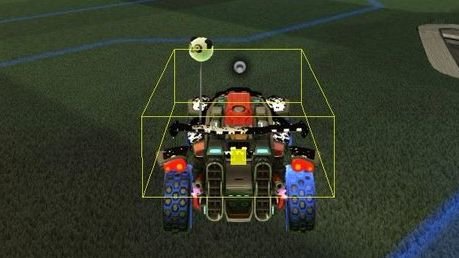
For example this is used by the Hitbox Plugin by mega and HalfwayDead/Rocket Science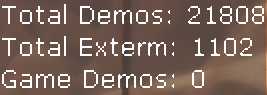
You can also do more basic things, like text in my stat counter plugin OBSCounter
First in your .h, define a function that will take a canvas.void Render(CanvasWrapper canvas);
Then you need to register the function in your .cpp code. This can be done in OnLoad or any other place where you want to start the rendering loop
gameWrapper->RegisterDrawable([this](CanvasWrapper canvas) {
    Render(canvas);
});
Now every single frame, the Render function is called with a valid canvas to draw on.
In Render you can do a ton of stuff with the canvas. Here's a quick definition of one. Look for plugin homepages on BakkesPlugins for examples and source code
// in a .cpp file
void CoolPlugin::Render(CanvasWrapper canvas) {
    // defines colors in RGBA 0-255
    LinearColor colors;
    colors.R = 255;
    colors.G = 255;
    colors.B = 0;
    colors.A = 255;
    canvas.SetColor(colors);

    // sets position to top left
    // x moves to the right
    // y moves down
    // bottom right would be 1920, 1080 for 1080p monitors
    canvas.SetPosition(Vector2F{ 0.0, 0.0 });

    // says hi
    // draws from the last set position
    // the two floats are text x and y scale
    // the false turns off the drop shadow
    canvas.DrawString("Hi Cool Dude", 2.0, 2.0, false);
}

The result is a bit underwhelming, but there's loads more you can do with this awesome tool.
You can include images too
I highly recommend checking the Hitbox Plugin Source if you want to render things relative to locations on the field
CanvasTool Plugin also lets you test out some canvas things easier